

By now, scheduling a fitness class should take your member two taps. If it takes long and its giving both you and your members a headache, or if you’re patching together more than one app, that’s usually a sign to update your tech stack and get into better software.
In this guide, we compare 10 tools built specifically for fitness class scheduling. We’ll keep it focused on automating recurring class schedules, capacity, waitlists, cancellations, and multi-location control. Jump to the comparison table for a fast shortlist, or read the buying framework first so you know exactly what to test in a demo with one of these platforms.
TL;DR: Choosing fitness class scheduling software comes down to compatibility. This guide compares top platforms and recommends the ideal fit for boutique studio owners who want scheduling, payments, and member retention tools in one place.
What Is Fitness Class Scheduling Software?
Fitness class scheduling software is a tool built specifically to run group classes. It includes automation across one or more locations:
- Recurring sessions
- Instructor rosters
- Room or capacity limits
- Waitlists
- Member bookings
The word “fitness” is what sets it apart from general appointment schedulers, too. Appointment schedulers handle one-on-one bookings across many industries but weren’t built for the operational needs of a fitness studio or gym.
While your scheduling platform of choice can also serve as a standalone tool, typically, it’s part of a larger gym management software, which bundles scheduling with membership billing, CRM, marketing tools, and more.
And honestly, you wouldn’t want it any other way. Yes, an all-in-one platform might cost more overall, and it may take your team a little time to get used to. But if you’re serious about keeping pace with where the fitness industry is headed and growing your business, that’s exactly what you need. It’s the trade-off that pays for itself.
Read our comprehensive guide on the best all-in-one software for:
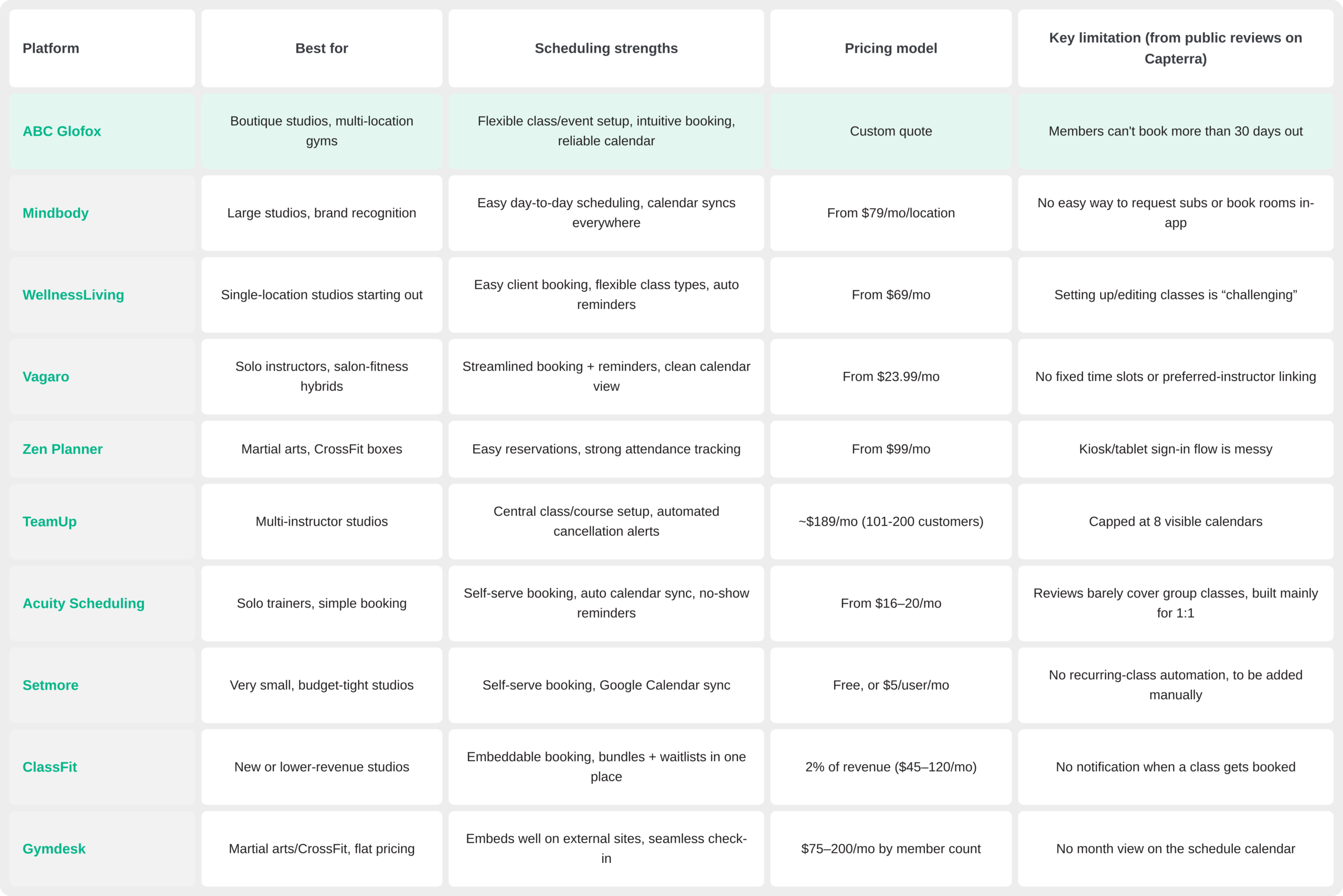
Quick Comparison of the Best Gym Scheduling Software
Pricing and “best for” are pulled from each platform’s official pricing page; scheduling strengths and limitations come from verified Capterra and G2 user reviews. Fact-checked August, 2026.
Still Deciding Between a Few of These?
See how ABC Glofox handles your real class schedule, waitlists and all, before you commit to anything.
The 10 Best Fitness Class Scheduling Software for 2026
We evaluated these platforms on scheduling capabilities, member experience, and how well each one fits a boutique studio rather than a big-box gym.
1. ABC Glofox
Snapshot: Best for studios that want scheduling built into a full member system, from a single location to a growing multi-site brand.
You can set up a recurring class once, and it shows up everywhere: the staff dashboard, the reports, and the branded mobile app members actually book through.
What makes ABC Glofox different from a standalone scheduler is what’s underneath:
BeatBox Boxing Club grew bookings 22% after switching to ABC Glofox
“ABC Glofox is so systematic it makes my life much easier,” says founder James Murphy.
2. Mindbody
Snapshot: Best for larger studios that want a recognizable brand name and don’t mind a longer setup.
Strengths: Day-to-day scheduling reviewers call easy, plus one-click calendar sync across your site, app, and every booking channel.
Gaps: Multi-session classes and workshops need more manual setup than standard recurring classes, according to several reviewers
There’s also a trade-off for a boutique studio: the marketplace puts you in direct competition with nearby studios inside the same app.
While base pricing starts at $79/month per location, costs increase significantly when adding features like a branded mobile app. Many users also report a steep learning curve during onboarding.
Read More:
- ABC Glofox vs. Mindbody for Boutique Fitness Businesses
- Best Mindbody Alternative for Boutique Studios in 2026
3. WellnessLiving
Snapshot: Best for single-location studios that want scheduling with light marketing tools included, not a full CRM.
Strengths: Easy client-side booking, flexible class-type setup for different session formats, and automated reminders reviewers specifically call out.
Some owners find the interface complex to set up, and the fully white-label member app is a paid upgrade. Like Mindbody, its Explorer directory can list your studio alongside competitors.
Pricing: from $69/mo, but that entry plan includes only one staff login. Unlimited staff quickly jumps to $199/mo.
Check Out: Class Scheduling Templates for Multi-Location Gyms
4. Vagaro
Snapshot: Originally built for salons and spas, with fitness features added over time.
Vagaro started in beauty and wellness, which gives it strong appointment-based scheduling and POS features. For class-heavy boutique studios, though, the platform feels less purposeful. Its branded app is a paid add-on, and the experience doesn’t match what you’d get from a fitness-specific management platform.
Pricing: from $23.99/mo, for a single calendar.
Check Out: Class Scheduling Templates for Multi-Location Gyms
5. Zen Planner
Snapshot: Best for martial arts, CrossFit, and other niche fitness verticals.
Strengths: Easy reservation setup and attendance tracking; reviewers say it holds up well, plus mobile apps for managing the schedule on the go.
Gaps: Reviewers mention a messy kiosk/tablet sign-in flow at check-in.
Pricing: from $99/mo, tiered by active members; exact tier pricing needs a sales call.
Read More: How to Make the Most of Your Fitness Class Booking App in 2026
6. TeamUp
Snapshot: Straightforward group-class scheduling without a lot of extras.
Strengths: Central class and course setup in one place, 2-way calendar sync, and automated cancellation alerts reviewers specifically appreciate.
Gaps: Reviewers report a cap of 8 visible calendars at once. Which is a problem if you’re scheduling for multiple locations.
Pricing: usage-based, around $189/mo for 101–200 active customers, with no flat sticker price to compare upfront
Read More: 6 Best Fitness Class Booking Apps for Studios and Gyms in 2026
7. Acuity Scheduling
Snapshot: Customizable booking pages best for solo trainers within the Squarespace ecosystem.
Acuity excels at one-on-one and small-group scheduling with automated reminders and payment processing. However, it isn’t built specifically for fitness. Acuity lacks membership management and a branded mobile app, so it’s better suited for appointment-based businesses than high-volume class studios.
Pricing: from $16–20/mo, with a 7-day free trial.
8. Setmore
Snapshot: A free scheduling tool that covers the basics.
Strengths: Self-serve booking with Google Calendar sync, group classes on the free tier, and custom service links reviewers find easy to set up.
Gap: Reviewers say recurring group classes aren’t automated; staff manually re-add the class each time instead.
Pricing: Free (capped at 200 bookings/mo), or $5/user/mo for unlimited bookings.
9. ClassFit
Snapshot: Best for new or lower-revenue studios that want scheduling embedded right on their own website.
Strengths: An embeddable booking widget, plus bundles, waitlists, and communication reviewers say live in one place.
Gap: Reviewers note no notification when a class gets booked.
Pricing: 2% of monthly revenue, from $45 to a $120/mo cap.
10. Gymdesk
Snapshot: Clean scheduling and billing for martial arts schools and small gyms.
Strengths: A calendar that embeds well on an external website, plus seamless member check-in.
Gap: Reviewers say the schedule view has no month-at-a-time option, only shorter views.
Pricing: $75–200/mo by member-count tier.
📝 Read More: Best Studio Booking Software 2026: A Fitness Studio Owner’s Guide
How to Choose Fitness Class Scheduling Software
Not every studio needs the same feature set. A solo instructor needs a lot less than a multi-location franchise does. But a handful of scheduling fundamentals matter no matter your size, and they’re worth testing directly rather than taking on faith.
Test each platform against these before you commit:
- Recurring classes: You don’t re-enter the class every week, it repeats automatically.
- Staff availability: You see who’s teaching what at a glance, so finding a sub is one message, not fifteen.
- Capacity and waitlists: When someone cancels, the next person on the waitlist gets the spot automatically.
- Cancellation rules: You set the cancellation deadline or cancel-by time once, and no-show fees are charged automatically, no chasing anyone down.
- Reminders: Class reminders go out automatically. You don’t send them yourself.
- Mobile booking: Members and staff can book, cancel, or adjust the schedule from their phone, no calls to the front desk.
- Payments and integrations: Failed payments retry automatically, and it syncs with the tools you already use.
- Reporting: You see attendance and usage by class, instructor, and location without pulling it together by hand.
- Multi-location control: You set the rules once from one dashboard, each location still runs its own day-to-day.
- Migration: Ask exactly what moves over from your current schedule and client list, and what doesn’t.
- Support: Ask if you get a real person or a ticket number when something breaks 20 minutes before class.
Check Out: Why a Branded App is a Game Changer for Small Gyms in 2026
Bring these questions into every demo:
- How do you handle a member trying to book a full class: waitlist, notify, or nothing?
- What happens automatically when an instructor cancels last-minute?
- Can members book, cancel, and rebook entirely from their phone?
- How are late-cancellation and no-show rules enforced: automatically or manually?
- What exactly moves over from our current system, and what do we rebuild from scratch?
- Who owns our client and booking data if we switch again later?
- What’s the real support response time on a live class-day problem, not the marketing claim?
- How does scheduling change across multiple locations: same rules everywhere, or configurable per site?
📝 Read More: Choosing the Right Gym Software: A Step-by-Step Guide
Switching Checklist for Fitness Class Scheduling Software
You’ve got a shortlist. Before you sign anything, run the platform through these 4 checks; this is where a good demo and a good fit stop being the same thing.
The switching checklist
- ✔️Migration & data ownership: Get it in writing: which records move automatically (members, class history, payment methods) versus what your team re-enters by hand, and who owns the exported file if you ever switch again.
- ✔️Setup & training: Ask for a real go-live timeline, not a vague “quick to learn.” Is staff training hands-on, or just a documentation link?
- ✔️Cancellation-policy testing: Before members ever see it, run a test booking through your actual late-cancel and no-show rules to confirm they trigger the way you configured them, not just the way the demo showed.
- ✔️Mobile booking QA: Book, cancel, and rebook a class from your own phone, staff side and member side, before your members do it for the first time live.
Free Resource: Triib Migration Playbook: Your Step-by-Step Guide to Switching
FAQs
1. What is fitness class scheduling software?
Fitness class scheduling software is built to run group classes, not one-on-one appointments; it is also called an online class booking system or fitness scheduling app. You can read the breakdown of the top platforms and best-in-class features in this article.
2. What is the best fitness class scheduling software for a small studio?
ABC Glofox is the strongest all-around pick: real class scheduling plus the member app, CRM, and retention tools to grow into, rated 4.4/5 on Capterra. For a cheaper version, Setmore might cover the basics for less. And for something more niche, Zen Planner or WellnessLiving might specialize further.
3. What features should gym class scheduling software include?
Any solid class management software needs recurring classes, capacity and waitlist management, cancellation rules, reminders, mobile booking, and reporting, plus role-based permissions if you run multiple locations. You can find out more in this article.
4. How much does fitness class scheduling software cost?
Fitness studio scheduling software pricing runs from about $5/month for bare-bones features up to $200+/month for full-featured plans, though most platforms, including ABC Glofox, quote custom pricing scaled to your studio instead. Add-ons and processing fees usually cost extra; see the comparison table above for exact figures.
5. What is the difference between a fitness booking app and full gym-management software?
A fitness class booking software just handles scheduling: get a class on the calendar, let members book it. Full gym-management software bundles that scheduling with billing, CRM, and marketing in one system. Most growing studios outgrow the standalone version faster than they expect.
6. Can scheduling software manage waitlists, late cancellations, and no-show fees?
Yes. Most booking software for gym classes covers this, but automation varies: some auto-fill a waitlist and charge a no-show fee with zero staff involvement; others need someone to enforce it by hand every time. That gap is why the cancellation-policy test above matters.
7. Which scheduling platforms work for multiple locations?
ABC Glofox, Mindbody, and TeamUp are built for it, with centralized settings and role-based permissions so HQ sets policy once, not per site. Acuity Scheduling, Setmore, and ClassFit are built around a single calendar and get clunky fast once you add a second location.
8. How should a gym test scheduling software during a demo?
Bring a real scenario, not a hypothetical one: your actual class schedule, busiest waitlist, trickiest cancellation rule. The eight questions in the buying framework above are a good script to bring.
Find the Right Fitness Class Scheduling Software with ABC Glofox
Every empty spot in a sold-out class is lost revenue; every clunky booking flow is a reason for a member to look elsewhere.
The right platform closes both gaps at once: scheduling that actually fills the waitlist on its own, wrapped in a branded member experience that feels like your studio, not a rented app.
Bring Your Messiest Class Schedule to Us
Waitlists, substitutes, and all- into one platform built to handle it.