Dance Studio Software: How to Manage Bookings, Payments and Classes in One Place


Get the monthly playbook digest
Unsubscribe any time.
TL;DR: Dance studio software runs your scheduling, billing, and communication from one place, so you spend more time teaching and less time on admin.
It’s a Tuesday night in spring. You’ve finished teaching your last class, and your phone won’t stop buzzing.
One parent wants to move their daughter’s ballet lesson to a later slot. Another is asking when recital tickets go on sale. Three tuition payments bounced this week. There are still unsigned forms to follow up on.
None of this is teaching dance. All of it lands on you.
If that sounds like your week, you’re not alone, and you’re not short on effort. You’re short on systems.
The right dance studio software combines scheduling, billing, and communication so admin work stops eating away at your time. This guide covers what to look for in dance studio management software and how ABC Glofox can help lift some weight off your shoulders.
A dance studio doesn’t run like a typical gym or fitness studio, which trips up many generic scheduling tools.
Start with the person making the payments. In most fitness studios, the person taking the class is the one swiping the card. In a dance studio, however, the dancer is often a child or adolescent, and the buyer is their parent. Your software has to serve both.
Moreover, dance studios run on recurring tuition payments over a season, often for several classes under a single family account. A simple “charge per class” tool doesn’t account for this scenario.
Finally, a dance studio’s whole year builds toward recital season: a months-long climb of costumes, rehearsals, ticketing, and lineups. Your software needs to accommodate this seasonality.
For all these reasons and more, dance studios have unique requirements — and dance studio management software needs to meet these needs.
📝 Read More: Gym Membership Statistics You Need to Know
In the dance world, it’s common for a single family to enroll two kids in multiple classes between them, all on the same monthly payment schedule.
Manually tracking tuition payments across a hundred families is time-consuming and error-prone, especially when you have other responsibilities on your plate. Little mistakes can become costly errors over time.
Drop-in style payment tools are designed for a single person paying for a single session. Dance billing, on the other hand, is recurring, layered, and often family-based. It’s easier to run your studio when you’re not the one having to chase late payments and re-run expired cards.
Dance studio management software built for recurring tuition is one solution. Once set up, you’ll see payments posted on schedule and failed charges automatically retried. Flexible accounts and discounts stay organized without the need to send manual invoices. In turn, you stop being the collections department and start getting your time back.
📝 Read More: Best Studio Booking Software 2026: A Fitness Studio Owner’s Guide
Recital season is the be-all and end-all of dance studios.
For a few intense months, you become a production manager. There are costumes to size, order, and track across dozens of dancers. You need to build and rebuild lineups as routines change. Finally, you need to sell tickets and coordinate with volunteers. It’s the single most amazing and stressful time of the year, and it lands right when your dancers need you the most.
So, how does dance studio software fit in? Good software can help manage scheduling, payments, and communication so you’re not shouldering all the administrative burden. In turn, you’re freed up to put more time and energy into the show itself.
📝 Read More: SOL Pilates LA: Building a Latina-Led Pilates Community With ABC Glofox
Your dancers’ parents need to be kept in the loop at every turn. They need to receive every schedule change, payment reminder, and recital update, ideally from the convenience of their phone.
However, when you’re juggling parents via email, texts, and group chats, simple correspondence can become a second job. (How many times have you already sent out the most recent schedule change?) Unfortunately, missing a single message can lead to crossed wires and a poor experience for that family.
This is where automated communication comes in. Once set up through your dance class booking software, notifications about schedule changes, class reminders, and updates are automatically delivered. Parents stay informed without you having to retype a thing.
A login portal takes this further. It’s even easier for families to book classes, check their schedule, and update payment details all from their own phones. The back-and-forth is cut down to almost nothing.
Finally, dance studio scheduling should handle recurring dance classes across multiple rooms, instructors, and even locations, without causing double-bookings. Imagine all the time you’ll save.
📝 Read More: See Every Studio Clearly with ABC Insights for Glofox
Not every platform is equally suited to handle the operational needs of a dance studio. When you’re comparing options, these are the feature categories that matter most for dance class booking software.
Dance studio scheduling is the backbone of your business. A good dance class booking software has to handle recurring classes across multiple rooms, instructors, and locations without double-booking. Waitlists and capacity limits ensure your most popular classes fill up instead of turning families away.
This is the make-or-break category for dance. It’s important to offer recurring tuition billing, class packs, and flexible discounts. Just as important: automatic retries for failed payments and expired cards, so a declined charge doesn’t become an awkward conversation.
Because the buyer is usually a parent, communication tools are essential. SMS, email, and push notifications make group communication simple across devices. Automated reminders for schedule changes and payments ensure parents are always up to date.
A branded app lets parents book, pay, and check schedules from their phones. It also accomplishes something subtler but valuable: every time a family opens the app with your studio’s name and logo, it reinforces that you’re a professional dance studio, no matter your size.
📝 Read More: 6 Best Fitness Class Booking Apps for Studios and Gyms in 2026
Dance studio tools generally fall into two camps: dance-specific platforms built around recital and costume logistics, and flexible all-in-one studio software that covers the core operational needs of many studio types. Here’s how a few well-known options compare on the capabilities that matter most.
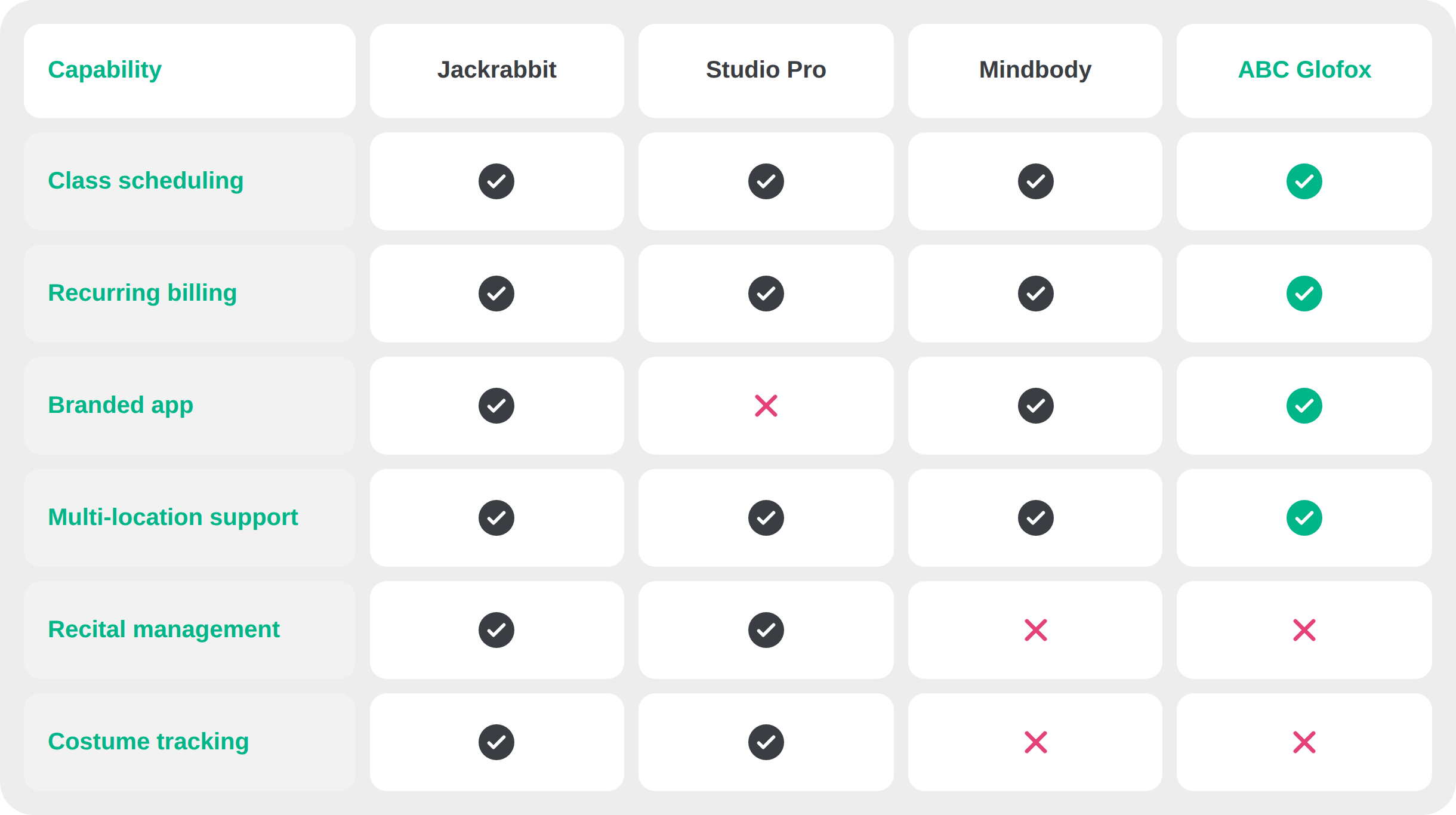
So which camp is right for you? If recital and costume tools are non-negotiable, dance-specific platforms like Jackrabbit and Studio Pro are built for that. For a flexible, all-in-one solution covering scheduling, recurring billing, and multi-location support, ABC Glofox and Mindbody are better fits.
Managing a Pilates studio too? Download our free Pilates Studio Toolkit for instant SOPs, retention, and capacity playbooks.
ABC Glofox supports your dance studio by taking operational weight off your shoulders. Instead of managing bookings, tuition, and studio communication, you can focus on what you do best: teaching your dancers and growing your community.
Your branded member app puts booking, payments, and scheduling in one place, with smart automations to make your life easier. Running more than one studio? Every location is easy to manage from a single dashboard.
Did you know? BollyOn Studios increased bookings by 44% with ABC Glofox. As founders Jaspreet Dhillon and Herrvena Kumar put it,
“Glofox has everything – it’s a one stop shop!”
Some studios pick dance-specific software like Jackrabbit or Studio Pro, which have recital and costume capabilities. Others go with all-in-one platforms like ABC Glofox or Mindbody, which reduce admin across your whole studio.
It depends on the platform. Dance-specific tools typically include recital ticketing and costume tracking. All-in-one platforms simplify operations across your entire studio, all year long, rather than focusing on event-specific features.
It should. Look for recurring tuition that posts automatically, accounts that apply flexible discounts, and automatic retries for failed payments. That way, late or missed payments are one less thing for you to worry about.
Dance-specific software is built around recitals and costumes; these are its strengths. General studio management software is more flexible and covers needs that many studios share: scheduling, recurring billing, communication, and a branded app.
Many dance studios find that the time savings and operational benefits from general studio management software outweigh the need for recital-specific features.
📝 Read More: Best Fitness Class Scheduling Software for Gyms & Studios
Odds are you didn’t start a dance studio to chase bounced payments or retype emails again and again. You got into it for the love of dance.
The right dance studio software makes it easier to run the operational side of your business. In turn, you have more time and energy to devote to where it matters.
ABC Glofox is purpose-built for fitness businesses, including dance studios. With class bookings, payments, and communication all in one place, you can spend less time hunched over a computer and more time with your students.
Ready to spend less time on admin and more time on dance? Get a free demo today.