

CrossFit affiliates aren’t run like traditional gyms. The WOD changes daily, class turnover is tight, and members care about one thing above all else: measurable progress. PRs, benchmarks, leaderboards. This is a membership base that is motivated by the numbers on the whiteboard.
That’s exactly why generic gym software falls short for a CrossFit context. A platform built for a big-box gym or a yoga studio isn’t designed around daily programming, performance tracking, or the tight-knit community that defines a box. CrossFit-specific software needs to do two jobs at once: run the business side (billing, scheduling, memberships) and support the floor experience (tracking, leaderboards, community), without forcing you to use three or four separate tools to get there.
Built to Handle Both Sides of the Box
Whether you’re running a single affiliate or scaling to multiple locations, the right software should feel invisible on a normal day and indispensable the moment something goes wrong, in cases like a missed payment, a packed class, a member who’s quietly drifting toward cancellation.
In this guide, we’ll break down what CrossFit gym software actually is, the features that matter most, how it compares to general gym management platforms, what it costs, and how to switch without disrupting your box.
What Is CrossFit Gym Software?
CrossFit gym software is a management platform built specifically for the operational and coaching needs of a CrossFit affiliate: combining class scheduling, billing, and membership management with CrossFit-specific tools like WOD programming, benchmark tracking, and leaderboards.
More than just features, the difference from general gym management software comes down to depth. A generic platform can usually handle bookings and payments for any fitness business. But it typically has no concept of a “benchmark WOD,” no way to log a Fran time against a member’s history, and no leaderboard to post on the box TV. CrossFit software is built around the affiliate model from the ground up, rather than having performance tracking bolted on as an afterthought.
5 Must-Have Features for CrossFit Affiliates
📝 Check Out: Martial Arts Studio Software: Guide for MMA & BJJ Gyms — running a hybrid box with another discipline alongside CrossFit? This guide covers the same buying logic for a different niche.
1. Class Scheduling & Capacity Management
CrossFit classes run on tight, structured time slots, and most boxes cap headcount for coaching quality and safety. Your software needs to handle waitlists, drop-ins, and check-ins without a front-desk bottleneck before every class, ideally with self-service check-in so your coaches can stay focused on the floor.
This matters more at peak hours than any other time of day. A 6 p.m. class that fills up in minutes needs a waitlist that automatically promotes members when someone cancels, rather than a coach manually working a phone or clipboard between warm-up and the workout brief.
2. WOD & Performance Tracking
This is the feature that separates CrossFit software from everything else on the market. Members want to log their Fran time, track a 1-rep max back to the day they started, and see how this month’s Grace compares to last month’s. The best platforms make this visible and social.
3. Billing & Membership Automation
Recurring billing, retail and merch sales, and flexible membership tiers (unlimited, punch cards, drop-in passes) all need to run without manual follow-up. Failed payments and expired cards are one of the most common (and most preventable) causes of member churn, so automated retries and reminders matter more than they might seem to at first glance.
Flexibility matters too. Affiliates often run a mix of memberships, with a core unlimited plan, a punch card for occasional members, and a drop-in rate for visiting athletes, and your software should handle all three without extra manual setup for every new member type you introduce.
📝 Read More: Gym Payment Software: How to Simplify Payments and Billing at Your Fitness Studio
4. Member App & Community Features
From their phone, members should be able to book a class, log a score, and see how their friends did. Community is the reason most people choose a boutique box over a big-box gym in the first place, and software that reinforces that (milestone shoutouts, social feeds, class check-ins visible to the group) helps retention as much as any billing feature does.
5. Workout Displays & In-Gym Screens
A live TV display showing the WOD, the clock, and a running leaderboard is a small feature with an outsized impact on the training atmosphere. It’s also one of the more overlooked differentiators between platforms: many general gym tools don’t offer it at all, while it’s often core to purpose-built CrossFit software.
CrossFit Gym Software vs. General Gym Management Software
The short answer: general gym software can run your front desk, but it usually can’t run your floor.
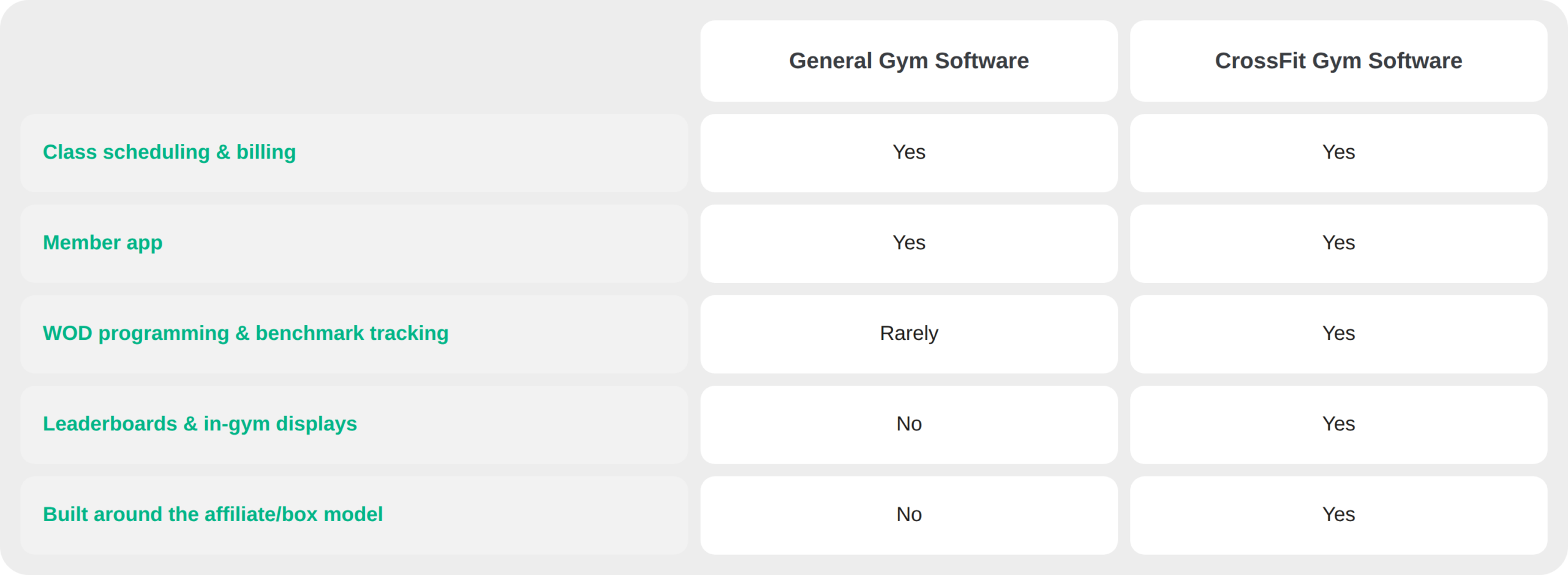
If your business is purely scheduling and payments, like a yoga studio or a spin box, general software works fine. But for a CrossFit affiliate, the tracking and community layer is often the reason members joined in the first place, which makes it a retention tool as much as a training tool.
FAQ
How Much Does CrossFit Gym Software Cost?
Most CrossFit gym software runs about $100–$200 a month, priced on a monthly subscription and typically scaled by your member count or by a flat monthly fee that covers a set range of active members. As a reference point, Zen Planner starts around $99/month, Wodify around $179/month, and PushPress Pro around $159/month. Some providers also charge separately for add-ons like a branded member app, marketing/CRM tools, or additional locations, so keep those in mind when comparing sticker prices.
When comparing providers, look past the sticker price and factor in what’s actually included: is WOD tracking bundled in, or is it a paid add-on? Does the quoted price include payment processing fees? And is there a setup or onboarding cost on top of the monthly rate? The cheapest plan on paper isn’t always the cheapest one in practice once those extras are added back in.
It’s also worth asking how pricing scales as you grow. A per-member pricing model can work in your favor early on, but if you’re planning to expand to a second location or grow past a few hundred members, a flat-fee or tiered model may end up being more predictable (and easier to budget around) over the long run.
Is There Free CrossFit Gym Software?
Free, full-featured CrossFit gym software is rare. Most providers offer a free trial period rather than a permanent free tier, since the value of the platform comes from ongoing billing, member management, and support that has real operating costs behind it.
If you’re a brand-new affiliate with a small member base, a free trial is a reasonable way to test whether a platform fits your workflow before committing. Beyond the trial period, though, expect to pay for a tool that handles your billing and member data reliably — this is core business infrastructure, not a nice-to-have app.
Switching CrossFit Software Without Disrupting Your Box
Switching providers is one of the biggest hesitations box owners have, and it’s a reasonable one, because a bad migration can mean lost member data, billing hiccups, or member confusion right in the middle of your busiest hours. No one wants that.
A clean switch usually comes down to three things: a clear data migration plan (members, billing history, and benchmark data all need to move over intact), a short overlap period where both systems can run in parallel, and proactive member communication so nobody is surprised by a new app or a new check-in process. Most providers can complete a migration in a matter of weeks, not months, when the data handoff is planned properly.
Billing continuity matters most here. A mishandled transition that causes failed payments or member confusion is one of the fastest ways to trigger the kind of involuntary churn we’ve written about before. If your current provider can’t guarantee your members won’t notice a hiccup in their billing during the switch, that’s worth pushing back on before you sign anything.
Does CrossFit Software Work for Hybrid Boxes (CrossFit + HYROX + Bootcamp)?
Yes, and this is an increasingly common setup. Many affiliates now run CrossFit classes alongside HYROX-style training, bootcamps, or open gym hours to diversify revenue and appeal to a broader membership base.
The right software should support this without forcing you to run separate systems for each format. That means flexible class types and scheduling templates, membership tiers that can mix and match access across formats, and performance tracking that isn’t locked into a single training style. If you’re already thinking about adding HYROX or hybrid programming, it’s worth confirming upfront that your software can flex with you rather than needing a workaround down the line.
Run Your Box on One Platform
CrossFit affiliates need one platform that handles the business side and the floor experience together. That’s what CrossFit-specific software is built for, and it’s worth choosing a provider that can grow with you as your programming evolves.
Get a free demo and see how ABC Glofox can run your box’s scheduling, billing, and member experience in one single place.